

OpenVPN and WireGuard
Run supported VPN connections from the router instead of installing a VPN application separately on every compatible device.
DD-WRT is alternative router firmware for users who want more control than stock software usually provides. Learn what it adds, how it works with VPN routers, and which FlashRouters setup path fits your hardware.
DD-WRT is alternative open-source router firmware designed for users who need deeper control over their network. It replaces the original manufacturer interface on supported hardware.
Instead of being limited to basic WiFi, guest-network, and manufacturer-app settings, DD-WRT can provide advanced VPN, routing, wireless, firewall, monitoring, and network-management options.
That additional control also makes DD-WRT more technical than most stock firmware. The exact router model, hardware revision, firmware build, and installation process all matter.
FlashRouters reduces that setup friction with a DD-WRT FlashRouter and Flash My Router DD-WRT service for selected compatible routers.
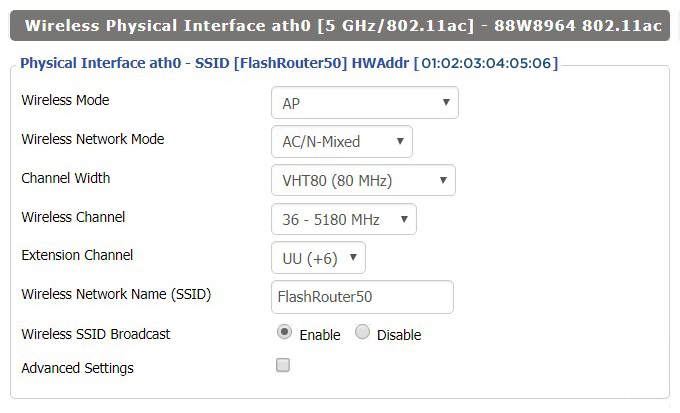
A representative view of the DD-WRT Wireless Basic Settings interface. Available fields and wireless options vary by router model, hardware, and installed DD-WRT build.
View DD-WRT setup example →Feature availability varies by model and build, but these are the primary reasons users choose DD-WRT over a basic stock interface.
Run supported VPN connections from the router instead of installing a VPN application separately on every compatible device.
Send selected devices or IP addresses through a VPN while other devices continue using the standard internet connection.
Separate work devices, guest users, smart-home hardware, VPN clients, or other device groups into different network segments.
Use supported hardware as a router, access point, wireless client, bridge, repeater, or part of a specialized wireless layout.
Review traffic levels, connected clients, router resources, and network activity using DD-WRT status and monitoring tools.
Prioritize selected traffic and configure detailed firewall, filtering, port-forwarding, NAT, and access rules.
Buy a router with DD-WRT already installed or keep eligible hardware you already own and use the assisted Flash My Router service.
The simplest path when you want supported DD-WRT hardware without selecting a build or installing the firmware yourself.
Use an assisted remote service for selected compatible ASUS, Linksys, and Netgear routers you already own.
The best route depends on how much control you need, whether you already own compatible hardware, and how comfortable you are with firmware installation and troubleshooting.
| Option | Best for | Key consideration | Next step |
|---|---|---|---|
| Stock firmware Basic use | Basic WiFi, manufacturer-app controls, and simple home networks. | Usually the easiest and lowest-maintenance interface, but it may provide fewer VPN, VLAN, routing, and firewall controls. | Compare My Options |
| DIY DD-WRT Technical | Experienced users comfortable selecting builds, installing firmware, and handling router recovery procedures. | Provides maximum control, but compatibility, build selection, installation, and recovery are your responsibility. | Check DD-WRT Database |
| DD-WRT FlashRouter Easiest new router | Users buying a new router who want DD-WRT already installed and tested on supported hardware. | Avoids DIY flashing and build selection while providing a direct router-level VPN and advanced-networking path. | Shop DD-WRT Router |
| Flash My Router Existing hardware | Users who already own a supported ASUS, Linksys, or Netgear router. | Keeps existing hardware and adds assisted DD-WRT installation, but the exact router model must qualify. | Check Compatibility |
DD-WRT is commonly used for VPN-router setups because it moves the VPN connection to the router and can apply routing rules to selected devices.
OpenVPN is a mature router-level VPN option supported by many VPN providers. It is commonly selected where broad provider compatibility and established configuration options matter most.
Learn About OpenVPN →WireGuard can provide a lighter and faster VPN path on supported hardware and builds. Availability still depends on the router, firmware build, and VPN provider configuration.
Learn About WireGuard →DD-WRT is powerful, but it is not automatically the best firmware for every router owner.
Users who need router-level VPN, policy routing, VLANs, advanced wireless modes, firewall rules, or deeper network visibility.
Users who only need basic WiFi, simple manufacturer-app controls, and the lowest-maintenance network experience.
Use the Router Quiz when you want help comparing DD-WRT, Merlin, OpenWrt, Privacy Hero, or a standard router setup.
Take Router Quiz →Start with the Linksys MR7350 DD-WRT FlashRouter or check whether your existing router qualifies for the Flash My Router service.
Compare firmware platforms, VPN protocols, and network layouts before deciding which router path fits your setup.
Key details to understand before choosing a DD-WRT router or changing the firmware on hardware you already own.
Choose a ready-to-use Linksys DD-WRT FlashRouter or check whether your existing router qualifies for an assisted Flash My Router upgrade.
